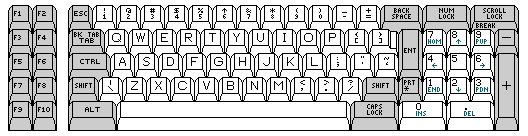
The IBM Personal Computer, announced on the historic date of August 12, 1981, and first delivered ahead of schedule in October, had the keyboard arrangement illustrated below:
For simplicity, and to avoid having to abbreviate the legends on some keys, it does not show that many of the keys had a raised central portion, so that the faces of the larger keys were the same size as those of the smaller ones.
However, I have since exerted myself to produce a more faithful diagram of the appearance of the original keyboard for the IBM Personal Computer:
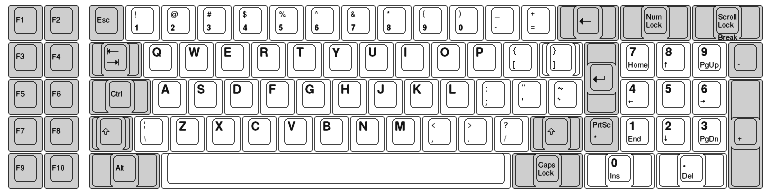
The keyboard was not changed when the IBM Personal Computer XT was introduced, which was a modified version of the IBM PC with a 10 megabyte hard drive and with more slots spaced more closely together, and this keyboard design was also retained for the 68000-based CS9000 system from IBM intended for use with laboratory instrumentation.
Essentially the same keyboard, although with some differences in the legends on the keys, had been used prior to the IBM PC, in the IBM System/23 Datamaster computer. This computer appears to have been intended as a successor to the IBM 5110-3 processor which formed the centerpiece of the IBM 5120 system.
When the IBM PC was first introduced, it came with a cassette tape port, and it was envisaged that at least a few people might purchase it for use as a home computer. The design was flexible; it was possible to purchase the computer with the CGA video card, compatible with television standards, to display color graphics, or with a monochrome adapter, which required a monitor, for more attractive display of 80-column text.
As there were a number of less expensive machines aimed at the home market, IBM later came out with a computer based on the IBM PC, but less expensive, which was aimed specifically at the home market. This was the PCjr, the keyboard of which is shown below:
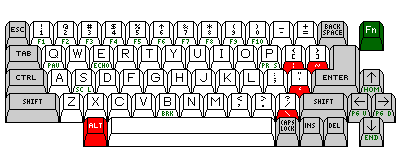
With only 62 keys, the keyboard of the PCjr computer achieves compatibility, or at least near-compatibility, with that of the IBM PC with a very small number of keys.
The Alt and Fn keys are shown in color in this diagram to make it clear that, while most of the functions on the front of the keys are reached by using the Fn key, the printable characters which no longer have their own keys are reached by the use of the Alt key.
The original PCjr keyboard, which had small keys to allow overlays, came in for some unjustified criticism. It may not have looked as much like a regular keyboard as its replacement, but neither the spacing of the keys, nor the technology used for the contacts (and hence the feel of the keyboard) was changed when they replaced the keyboard with one having a more conventional appearance.
Yet, at the time, a number of people did make the claim that the original keyboard had keys spaced too closely together for touch-typing, while the revised keyboard did not, and also claimed that the revised keyboard significantly improved the feel of the original.
It certainly was true that both the original and the revised keyboards for the IBM PCjr did not have the degree of tactile feedback which the IBM PC keyboard provided; however, this was also true for virtually all keyboards offered by competitors of IBM, which was almost alone in offering a mechanical keyboard rather than one with rubber contacts.
This keyboard came out before the 101-key keyboard, and, thus, was IBM's first PC keyboard to put both shift keys, the Enter key, and the Backspace key all in their correct positions, as found on a 44-key electric typewriter, as this computer came out in March 1984, as against mid-1985 at the earliest for the IBM Enhanced Keyboard.
That IBM went through several keyboard designs before reaching one that met this criterion seems unusual and unfortunate, as IBM had made many terminal devices with excellent keyboard arrangements. However, as we will see below, those were devices that were made for systems based on EBCDIC, and as soon as IBM started to include ASCII support on their computer systems, the change to keyboard arrangements with extra keys in positions awkward for touch-typists appears to have involved every IBM product that had a keyboard, including typewriters which had no provision for connecting to a computer system.
Since the main focus of this page is to criticize the original keyboard of the IBM PC, and the initial keyboard for the IBM PC AT as well, for having some keys in positions that are hard to reach, perhaps, to avoid confusion, I should include some background material here with which not all computer users may be familiar.
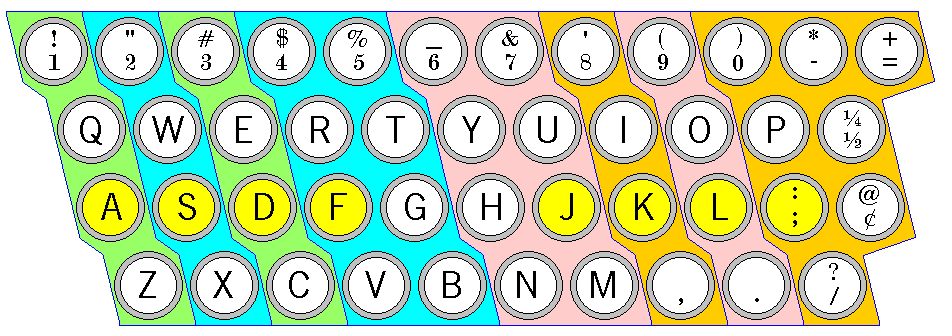
This diagram shows how typists are taught to place their fingers on a typewriter keyboard (here, a manual typewriter arrangement, rather than the electric typewriter arrangement, which is the basis of most computer keyboards, is shown) for purposes of touch-typing.
The two groups of four keys that the fingers of each hand are to rest above are shown with yellow backgrounds. Blue lines divide the groups of keys on the keyboard that are to be struck with each finger, and the background surrounding keys alternates between light green and light blue-green for the fingers of the left hand, and between pink and light orange for the fingers of the right hand.
As can be seen, the little finger of the right hand is assigned quite a few keys, but this is somewhat balanced by the fact that the columns of keys given to each finger slope to the left.
Thus, the sense in which some keys are described as "hard to reach" is this: a touch-typist will normally keep the four fingers of each hand on the home keys, extending one finger at a time to type a character elsewhere on the keyboard. If it is difficult to extend the hand so that the little finger can type a given key while the index finger remains on its home key (in the case of the right hand, the one for the letter J), then the typist will be forced to look away from either the screen or the copy being typed in order to return the hand to the proper position on the keyboard to type, without looking, the characters that are expected to be typed.
Another early computer from IBM which was based on the IBM PC but which had a different keyboard arrangement was the IBM 3270 Personal Computer. The arrangement of keys on this computer's keyboard is shown below:
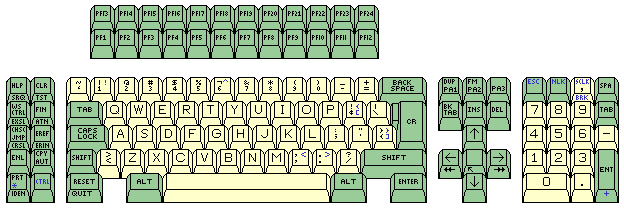
The positioning of the Enter key and the left shift key on the original IBM Personal Computer keyboard were unpopular with many users; these things were corrected in the keyboard for the IBM Personal Computer AT:
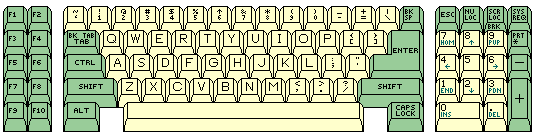
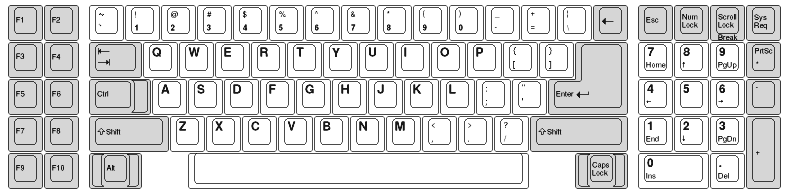
This keyboard, except for the extra System Request key, has exactly the same keys as the original PC keyboard, they are only arranged differently. This keyboard was very popular with computer users, despite the fact that now the Backspace key was hard to reach. So much so that when the 101-key Enhanced Keyboard, which will be discussed next, started to become common, many manufacturers of keyboards compatible with that keyboard produced keyboards with a layout that was modified to follow that of the 84-key AT keyboard more closely. (As will be clear from what follows, I am of the opinion that this was a mistake.)
As with the original PC keyboard, I have now made a more accurate image of its appearance:
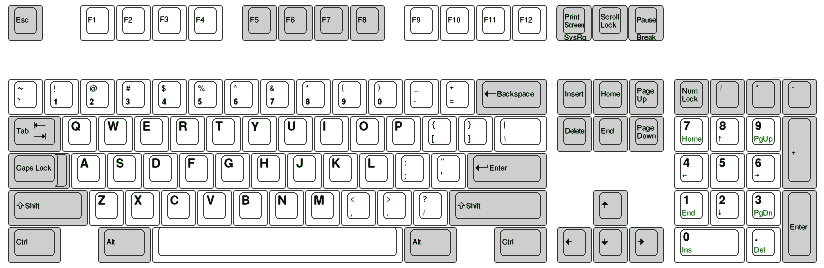
The diagram below shows the arrangement of keys on the 101-key Enhanced Keyboard. As this keyboard arrangement is likely to be very familiar, and to be at least the basis of the arrangement used on the computer at which you are viewing this web site, even if it is a Macintosh, it may seem hardly necessary to include an image.
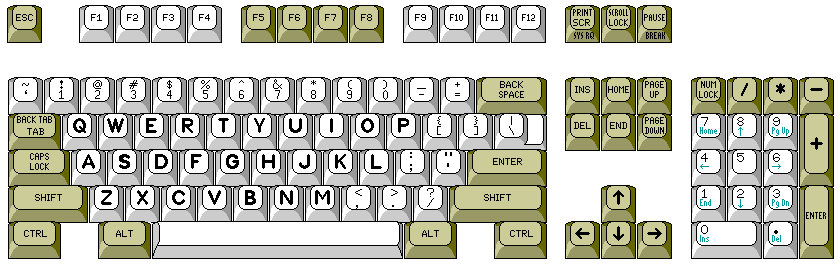
The 101-key Enhanced Keyboard was originally included with the IBM 7531 Industrial Computer, announced on May 21st, 1985. It was advertised by IBM as an option for the IBM Personal Computer and IBM Personal Computer AT at least from April, 1986, appearing in many of the same advertisements as also presented the IBM PC Convertible, introduced at that time. In those advertisements, it was called the IBM Enhanced Personal Computer Keyboard. When the Personal System/2 was released on April 2, 1987, this keyboard arrangement came even more forcefully to the attention of the public.
Again, I can provide a more accurate diagram:
Prior to the latter, the Compaq Deskpro 386 offered this type of keyboard as an option. This, however, doesn't mean that IBM copied Compaq.
In addition to the 7531, an article in BYTE magazine about the introduction of the Compaq Despro 386 noted that this keyboard arrangement was already in use on the IBM RT PC, which was IBM's first RS/6000-based workstation, and which ran IBM's AIX operating system, its licensed implementation of UNIX.
The IBM PC RT was available starting in 1986; however, the 101-key keyboard style was available for another IBM product even earlier, as an alert reader of this page has informed me. The IBM 3161 ASCII terminal from IBM, available in late 1985, is an earlier place where this style of keyboard was actually introduced. On the RT PC, and presumably also on the 3161, however, the keyboard did not include cursor functions as an alternate purpose of the number keys. Also, at least for the RT PC, all the keys were white, instead of some keys being a grayish-brown color.
But then I learned about the IBM 7531 Industrial Computer as the very first place the Enhanced Keyboard appeared, in mid-1985, from the Deskthority wiki; Deskthority being a major discussion group for mechanical keyboard enthusiasts.
This keyboard design attracted notice, and became the industry standard, after the introduction of IBM's Personal System/2 line of computers, on which it was used; however, before then, it was used on other IBM systems, including the IBM XT 286, some later models of the Personal Computer AT. Also, prior to the Personal System/2, the Compaq Deskpro 386 offered a keyboard in this style as an option.
This keyboard finally placed both shift keys, the Enter key, and the Backspace key all in the locations familiar to typists. As well, it offered a cursor keypad that was always available, so that one could keep the keyboard in Num Lock mode, and have the numeric keypad available as well.
One noted computer columnist criticized the keyboard for having two extra function keys which would be unlikely to be used by software, due to compatibility concerns, for quite some time to come. This was, in itself, a valid criticism, but he overlooked the justification for this addition: that IBM's mainframe terminals generally had a set of either 12 or 24 function keys, and thus this change made terminal emulation programs for them more convenient; on older keyboards, the programs could use the other keyboard mappings already used for those keyboards.
As noted above, while many competing keyboard manufacturers simply copied the new arrangement from IBM exactly, others had their own variations on it:
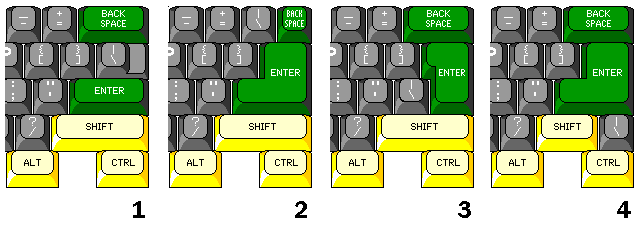
In this diagram,
Unlike the alternate arrangements (2) and (3), arrangement (4) doesn't make either the backspace key, the enter key, or the right-hand shift key less accessible, and it does have the benefit of returning to a more traditional larger Enter key, and thus it is the one alternate arrangement which I think might be considered an improvement.
Another arrangement, somewhat similar to that in (4), but aimed at the 102-key international keyboard, was only rarely seen; the Tulip ATK keyboard and the DTK SPK-102C keyboards are two examples of its use, and it is illustrated below:
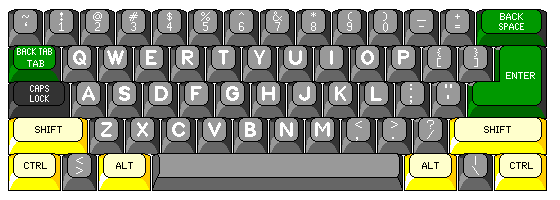
Incidentally, for another set of pages on this site, I had been researching the computer-in-a-keyboard products of Cybernet Manufacturing.
Their original units used arrangement 4 in the diagram above; then, after they restyled the case, they switched to arrangement 2, and when they restyled the case again, they went to arrangement 1! So keyboard fashions certainly changed quite a bit over time.
Many modified keyboard arrangements have been used to make the keyboard more compact for laptops. One early one of interest is that used on the IBM PS/2 model L40, as shown below:
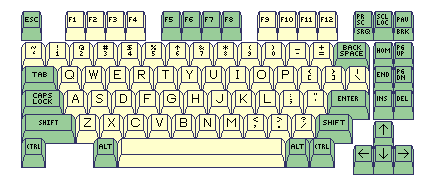
This arrangement was also used on the Model M4 keyboard that could be attached to desktop computers.
As the movement of the insert and delete keys to a position below the other four keys in that area on the keyboard has also been used recently to make keyboards for desktop computers, with and without a numeric keypad, somewhat more compact, such as on the Microsoft Keyboard 500, this keyboard can be viewed as having been a significant source of inspiration.
However, the arrangement of the six keys involved was different on the two keyboards:
|
|
Of course, I have always wondered why IBM didn't think a bit harder, and move a few keys around to keep the left shift key and the enter key (or, in the case of this keyboard's native application, the Field Exit or New Line key) in their standard positions, like this:
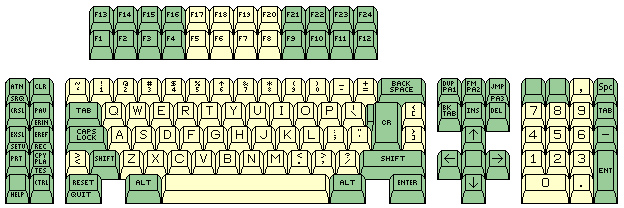
And, for that matter, they could very easily have avoided the same problem with the IBM Personal Computer as well:
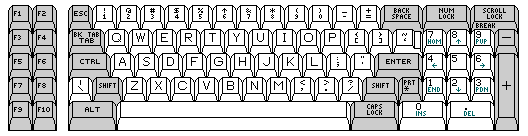
and with the IBM Personal Computer AT, the required alteration would have been truly trivial:
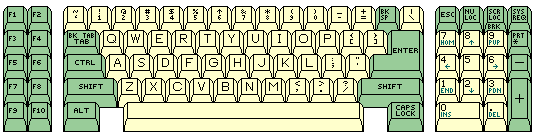
At least one manufacturer noted the response to the locations of the left-hand shift key and the Enter key on the original IBM PC keyboard, and offered an alternative:
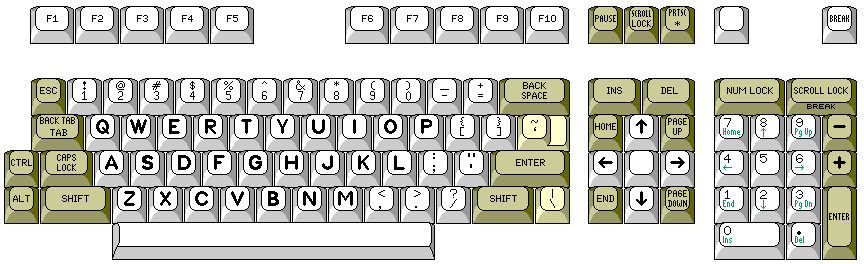
but while the Keytronics KB5151 did offer an improved arrangement, in those days, keyboards were still quite expensive to make, and so few people went to the extra expense to obtain an improved keyboard. Two printable character keys, shown in a cream color in the diagram, were actually buff-colored like the shift keys or the Enter key, and this was an unfortunate minor flaw.
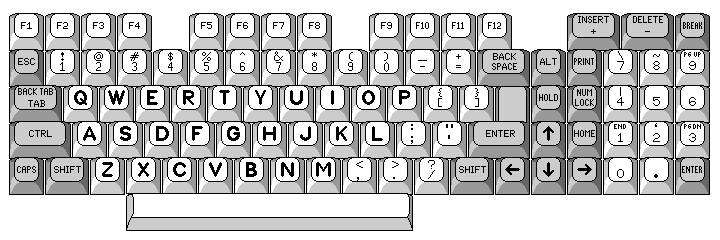
Another historic early attempt to improve upon the original IBM PC keyboard, but which unfortunately led to compatibility issues, was the keyboard of the Tandy 1000 computer:
One extremely interesting keyboard was that of the Fujitsu Micro 16s, and the version which included a hard disk pre-installed, the Fujitsu Micro 16sx. This was an 8086-based computer that ran CP/M-86, in addition to having a Z-80 with which to run CP/M programs. Of course, not being a clone of the IBM PC meant it disappeared from the market fairly quickly. It had the interesting feature that add-on cards with other CPUs, such as the 68000 or the Z8000 could have been made for it, but the demand did not materialize.
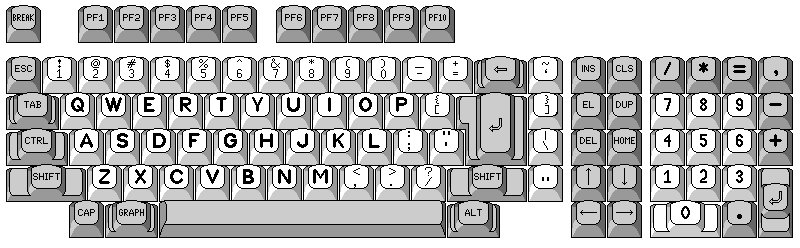
The arrangement of keys on this keyboard was very closely related to the arrangement of keys on the Japanese-language keyboard for their computers. All that had to be done was to move the backspace key, the large Enter key, and the right-hand shift key, one place to the left, thus taking four printable character keys out of the main typing area, and putting them to the right of those keys.
The simplicity of the change was, of course, no problem, because the result was placing the backspace, enter, and shift all in exactly the right places. Unfortunately, however, at least in my opinion, having the { and [ key on one side of the Enter key and the } and ] key on the other side of the Enter key was very unfortunate.
Ideally, instead, the two square brackets should have been on the near side of the Enter key; the classic typewriter-pairing arrangement, rather than the modified one, should have been used. The next best thing would have been to put the | and \ key on the near side of the large Enter key.
Then there was the TI Professional PC, which ran MS-DOS on an 8086 chip, and used the same floppy disk format as the IBM PC, but which otherwise had no pretensions to PC compatibility:
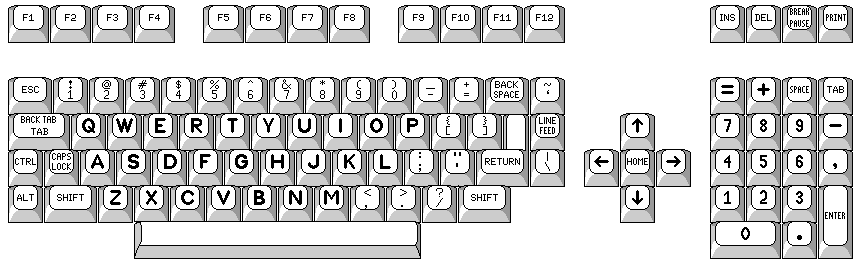
Although it did not fare too well in the marketplace, it was immortalized by the use of these computers as props in the television series V; even the alien Visitors used that computer, but with a modified keyboard bearing the symbols of their language.
Another computer that ran MS-DOS on an 8086, but which was not fully compatible with the IBM PC, had this nice keyboard arrangement:
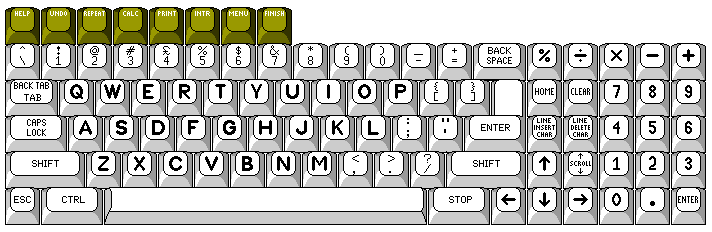
This was the keyboard design of the ACT Apricot computer, from the United Kingdom. Not shown is an LCD display panel on the right side of the keyboard which indicated the functions of eight touchpads used as function keys. The keyboard connected to the computer by a serial port, and had an internal clock with battery backup. Thus, the keyboard not only had a nice layout, but was unusually advanced in its functionality.
Another interesting keyboard from an early competitor to the IBM PC, this time the Televideo TS-1603, which used an 8088 as its processor, is shown below:
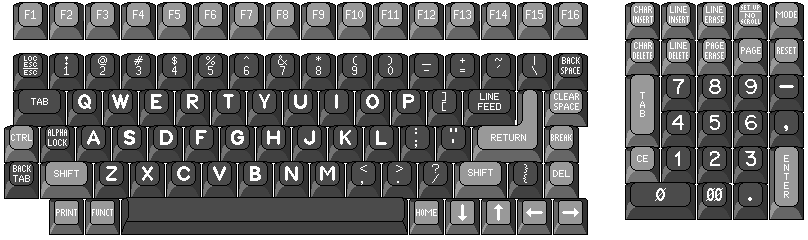
This one offered a choice of MS-DOS or CP/M-86. Notice that the keyboard is quite elaborate, offering a broad range of functions. Unlike the IBM PC keyboard, it is in the classic typewriter-pairing layout, with the two square brackets on one key, and the two braces on another. However, like the Fortune 32:16 shown below, it is actually in a reversed typewriter-pairing layout: open square bracket and open brace are the unshifted characters, rather than the shifted ones, on their respective keys.
I consider this to be an error. The reason I consider the classic typewriter-pairing layout worth considering is because it allows compatibility with the original typewriter-pairing APL/ASCII scheme, and a reversed typewriter-pairing layout will not allow that. Also, of course, while I am happy that the Return key is properly reachable, I am not happy about the location of the backspace key (or the fact that it isn't differentiated by color).
One positive thing about the keyboard is that it includes a tab key, and a comma, while dropping the * and / characters, in the numeric keypad. This is similar to the 122-key keyboard layout provided by IBM, and correctly acknowledges that the primary purpose of a numeric keypad is to facilitate data entry, not to allow emulation of a calculator.
The keys on the bottom row appear to have an unusual shape that is sloped forwards, and which also has less rounded corners. While this reminded me of the chorded shift keys of the Lawrence Livermore Laboratories keyboard mentioned on a previous page, obviously these keys are only meant to be pressed one at a time, so their shape does not have the same purpose.
Not all MS-DOS computers that competed with the IBM PC in the early days before total compatibility became the norm improved upon the keyboard layout of the IBM PC.
The keyboards for the SANYO MBC-550 and MBC-555, which were one of the first genuinely affordable alternatives to the IBM PC, used Fujitsu leaf switches, so the keys were of excellent tactile quality. But the keyboard had extra keys displacing both shift keys away from the main typing area; not only was the Enter key displaced by an extra key from its normal position, but the keys causing the displacement were one and a half times the width of a normal key, which I found particularly gratuitous, and there was also, unsurprisingly at this point, an extra key between the main typing area and the backspace key.
This keyboard is illustrated below:
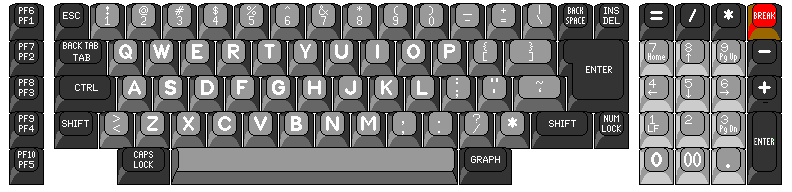
The most charitable explanation I could guess at for the design is that they used the same layout as was used for Japanese-language keyboards, which needed to have a few extra keys. And that was indeed the case. The Japanese version of those computers, the SANYO MBC-55, did have a keyboard with exactly the same layout, although on its keyboard, the key between Z and the left-hand shift key was a special shift key rather than a key for printable characters.
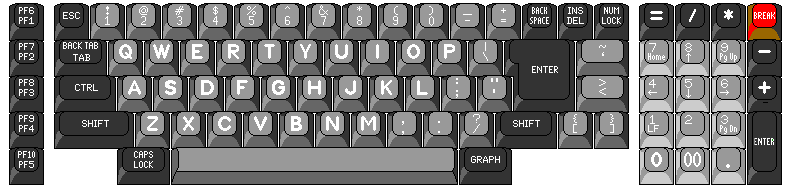
And, once again, it would have been so easy for them to have instead chosen an arrangement of keys that would have made for a beautiful keyboard, instead of one that left something to be desired for the touch-typist:
Going outside the MS-DOS world, other computers as well had to contend with the conflict between the full ASCII character set and the preferences of touch typists. For example, the Amiga computer, here represented by the keyboard of the first model, the Amiga 1000, opted for the solution used on the IBM Personal Computer AT:
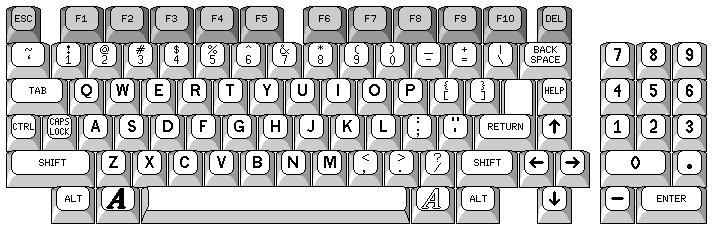
which I presume is a consequence of its having been introduced by Commodore on July 23, 1985, shortly after the IBM Personal Computer AT in 1984, leading to a perception that it would be the "standard" keyboard layout. It wasn't until the introduction of the IBM Personal System/2 in 1987 that IBM's realization that the keyboard of the AT was still a mistake, leading to the IBM Enhanced Keyboard (which had also been introduced in 1985) entered the broad public awareness. It's true that July 23, 1985 is later than May 21, 1985, when IBM first made the Enhanced Keyboard available but the design process for the Amiga, like any other new personal computer, takes a certain amount of time.
Its contemporary, the Atari ST, also followed the lead of the IBM PC AT:
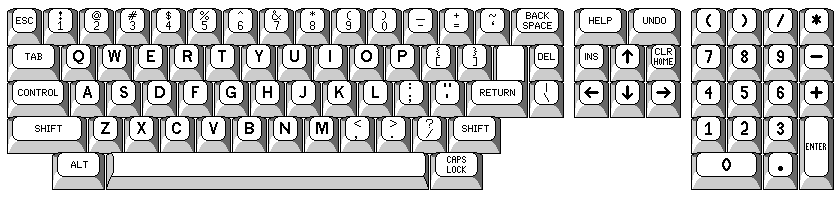
with various minor differences. The Atari ST also had ten function keys, but instead of being part of the keyboard proper, they were rakishly slanted as part of the casing of the computer, to blend with its styling.
Since there is some software that can benefit from a 122-key keyboard, but it has the disadvantage of a layout that differs from the 101-key standard, I've always wished that somewhat more elaborate keyboards might be available that attempt to combine the best of both arrangements:
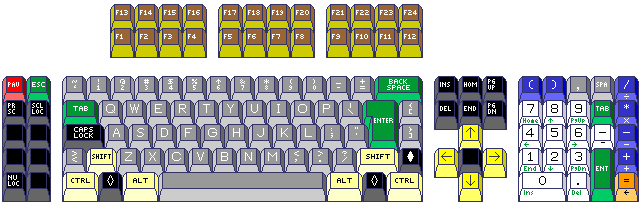
Note that, in the numeric keypad, there are two adjacent keys which both generate the - character. This may strike some viewers as bizarre. As may be obvious, though, the intent is that the numeric keypad might be used for a calculator, and the white - key would be the "change sign" key, while the blue - key would be the "subtract" key. These keys can be provided with distinct scan codes by having the "change sign" key use the same scan code as the key on the main typing keyboard with a differentiating prefix while the "subtract" key uses the distinct scan code used for the minus sign on the numeric keypad. This sort of thing is discussed on the following page about the scan codes of keyboards for the IBM Personal Computer and its successors.
Actually, in practice, it might be necessary to get just a little bit more ultimate:
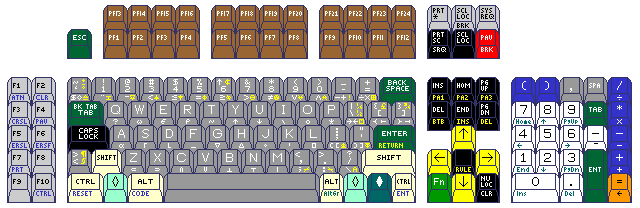
while using the ten keys to the left of the main keyboard for the left-over functions is sensible, as there are different Group 3 scan codes defined for the keys involved, it seems necessary to keep the keys in the traditional 101-key keyboard positions. As well, an Fn key is added, to allow choosing between different scan code sets for compatibility with different 122-key keyboards, for example.
Note that the three keys to the right of the letter P do not have the same positions as on the 102-key keyboard. As well, if I had been designing a keyboard from scratch, rather than one to provide compatibility with a number of keyboards for the IBM PC, I would have interchanged the backslash (\) and tilde (~) characters, so that the \ ` key would be at a remote position on the keyboard, while the | ~ key would be the one key with less common characters within the main 44-key area of the keyboard. (Of course, having an [ ] key in that position would have the advantage of providing the uppercase subset of ASCII, along with the lower-case letters, in that area, as was done on the TRS-80 Model 100 notebook computer, but as that loses the arrangement of { [ and } ] keys, I would not consider it.)
Thus, the first keyboard shown here was a 130-key keyboard; the 122-key keyboard with five calculator keys and three Windows keys added, and this keyboard is now a 139-key keyboard, with five keys from the 101-keyboard returned to the array, and three keys from the 84-key keyboard of the IBM Personal Computer AT added for total compatibility with really old computer games, and with an Fn key added.
After careful thought, I've come up with the following as the closest I can approach the best possible keyboard for general-purpose use:
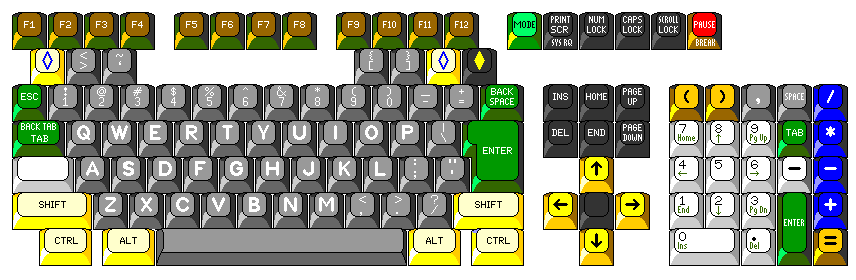
The numeric keypad includes some added keys from the 122-key arrangement, because having the comma, space, and tab there facilitate using the keypad for numeric data entry; and that, not simulating a calculator, is its real purpose. Also, adding an extra key from the 122-key keyboard among the cursor keys places them in what has historically been felt to be their best arrangement.
While the standard position of the Caps Lock key corresponds to that of the shift lock on a typewriter, this is a key that has come in for much criticism. As well, if the keyboard is to have switchable modes of operation, in some of which it will simulate having more keys, such as emulating a 122-key keyboard, a special key that is used for keyboard internal functions is needed, and if it is used as a shift key to make extra keys available, it should be in a convenient position.
It's true that many people are used to having the Control key in that spot, from many ASCII terminals. However, moving the Control key would affect the symmetry of the layout, and interfere with 122-key keyboard emulation. The Control key is reachable enough for touch-typing, and having a right-hand Control key also eliminates the need for two-key left-hand combinations.
However, instead of putting an Fn key in that spot, on further reflection, a Mode key was added to the keyboard to select which style of keyboard is in use, and this key was left as a blank white key, to indicate that it may serve various purposes. Thus, when an Fn key is not needed, it can function as a Control key or as a Caps Lock key.
Thus, if Meta, Super, and Hyper shifts are desired, the Alt keys can serve for Meta, the Ctrl keys can serve for Super, and the Windows Shift keys for Hyper, while the white key serves as the Control key.
In normal PC keyboard mode, it can serve as a Caps Lock key, or as another Control key, as desired.
When a 122-key keyboard is emulated, it can serve as an Fn key; Fn with F1 through F12 can be used to obtain PF13 through PF24, and Fn with the keys on the numeric keypad can be used for the functions on the keys to the left of the main typing area on that keyboard.
To obtain the ideal arrangement of the main typing area, some printable character keys (including the extra key from the international 102-key keyboard) are placed between the main typing area and the function keys. This seemed the only place I could put them and still have them reasonably accessible during normal typing. But given that the standard 101-key layout already has the Backspace, Enter, and right-hand Shift keys in their normal positions, all this change achieves is making the Enter key larger. Having keys in this area may be felt to increase the chance of pressing a function key by accident. Thus, that is likely to be the most controversial aspect of this design. Also, the Windows keys are now placed in this area, rather than leaving them out to be added in their usual location, which does interfere with the use of Alt and Ctrl.
Note also how Caps Lock and Num Lock are moved to be between Print Screen and Scroll Lock; while this disturbs the standard order of the three keys previously in that cluster, having the three lock keys in the same order as the indicator lights on the keyboard seems to be less confusing.
A more compact keyboard, applicable only to the 105-key keyboard, is shown on the page concerning keyboards in general, but a compact ultimate keyboard building on that keyboard could be the following:
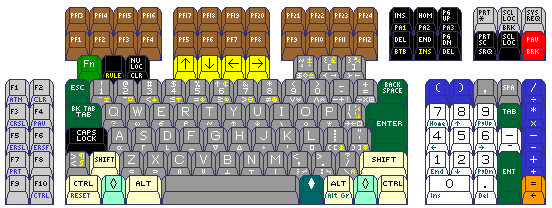
However, that keyboard, although it has many keys on it, could still be considered to be a bit provincial.
The keyboard design below:
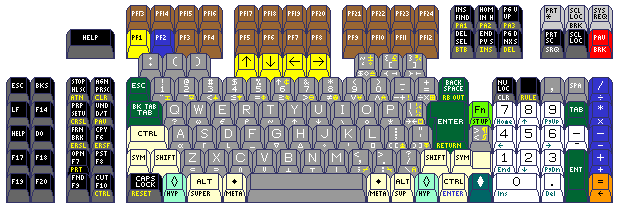
takes note of the fact that the Apple (or Swedish tourist attraction) key on Macintosh keyboards, as well as the Meta key on Sun keyboards, is between the spacebar and the key labelled as the Alt key, while the added Windows key on newer keyboards for the PC is on the outside of the Alt key.
So, having added keys on both sides of the Alt key leads to a keyboard that can be designed for use on the Macintosh and on Sun computers, as well as on PCs, as well as providing a clear and unambiguous location for Meta, Super, and Hyper.
The parenthesis keys are moved from the numeric keypad to be accessible instead from the main part of the keyboard by LISP programmers, and a colon key accompanies them. The Fn key is placed above the extra key for international keyboards, which is in turn placed above the right symbol shift key, which is above the Windows Menu key, and these four keys are placed in the area between the numeric keypad and the main keyboard.
Since Sun has made a version of Solaris available for the x86 architecture that runs on PC-compatible hardware, it would seem to be high time to have available a keyboard that supports that operating system on the one hand, as well as the use of Emacs and LISP, and IBM terminal emulation on the other hand.
And the Caps Lock key is switched with the left-hand Ctrl key so as to return the left-hand Ctrl key to its traditional location.
As well, the keyboard of the VT220 terminal, which will be shown below on this page, also supplied some items seen on this keyboard; the extra set of 10 function keys further to the left of the keyboard, legends in the lower half of the six keys found above the cursor keys (the top half being from the PC, and the front of the keys being from the 122-key keyboard) and in the first set of 10 function keys to the left of the keyboard (the top half being from the Sun keyboard, and the front of the keys from the 122-key keyboard again). The special coloring on PF1 and PF2 hearkens back to the VT78, the tradition of which affects how the VT220 is still used; in general, though, the coloring of keys on DEC terminals is not a major influence on the color scheme of this keyboard.
Or, for something which stays a bit closer to the conventional PC keyboard arrangement (omitting the VT220, but including the Sun and LISP machines as influences):
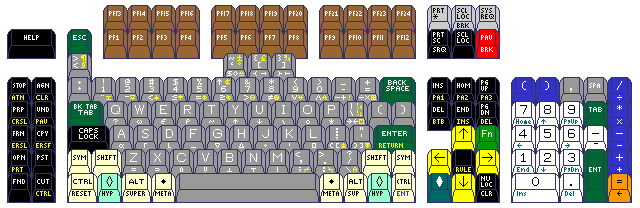
While a keyboard such as this may seem completely outré, it may be noted that there are firms which make multi-platform keyboard/video/mouse (KVM) switches which can allow one keyboard and mouse to control a number of computers, some of which are PC-compatible and some of which are Sun workstations. Allowing the PC-compatible computers to be used for 3270 emulation, and, thus, merging the Sun Type 5/6/7 keyboard design with that of the 122-key Host Connected Keyboard from IBM is not, in itself, necessarily lacking in practical merit.
But going beyond that to include the three keys whose scan codes were dispersed in going from the 84-key AT keyboard to the 104-key keyboard, presumably to allow the effective use of a very few very old PC programs, and providing support for perhaps running a LISP Machine emulator, yes, these are things that do have to be acknowledged as going too far. So, if we remove those excesses, we obtain something like this:
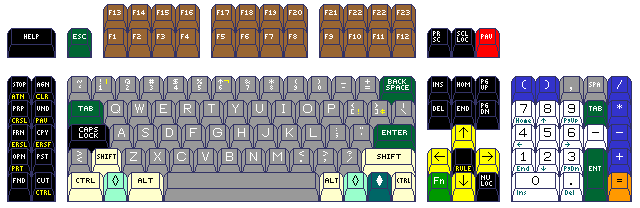
which also no longer shows the APL character set, plus an alternate word processing keyboard layout, on the keys, as well. Of course, a real product would likely not have the elaborate color scheme shown in this diagram either.
Keyboards with the backspace key, and/or the Enter key, in unusual positions were very common from a great many computer makers because of the fact that 94, rather than 88, characters need to be produced by a keyboard for ASCII with lower case. Displacing the shift key, on the other hand, is very unusual.
But it occasionally does happen. Displacing the right-hand shift key one position over, rather than the left-hand shift key as on the IBM PC, was done on the Atari 400 and 800 computers, and on at least one IBM product:
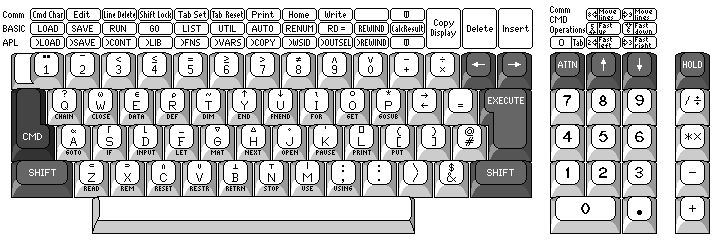
the fondly remembered IBM 5100 portable computer.
Shortly after its introduction, it was rumored that it was really an IBM 360 computer in disguise. The actual story is somewhat more complex.
The processor of the IBM 5100, internally referred to as PALM (Put All Logic in Microcode) was implemented with a first-level microcode store containing 32-bit words of microcode. This gave it a very simple instruction set that was still considered to be a form of microcode as well, in the form of 16-bit vertical microinstructions.
In the original prototype of the IBM 5100, called SCAMP, the APL interpreter from the IBM 1130 computer was used, and so this prototype ran an IBM 1130 emulator (written in the 16-bit vertical microinstructions noted above) to run APL. Because IBM 1130 APL had limitations, the decision was made to attempt to switch to IBM VS/APL for the System/370; writing an emulator for the required subset of System/370 instructions that would fit in the available space was viewed as a challenge, but it was successfully achieved.
Much more recently, it was revealed that the BASIC interpreter also made use of the same principle, but in this case it was System/3 emulation that was involved.
The microcode emulators for the System/370 and the System/3 were on ROMs that were in the computer's address space; the BASIC and APL interpreters, on the other hand, were on slower ROMs from which code was copied into read/write memory as needed.
The IBM 5100 had a switch on the front that would put the computer in a mode in which the computer's registers (which were kept at the start of memory) would be displayed on the screen in hexadecimal; memory location 0 was used as the program counter (for the 16-bit microcode), and a maintenance mode was available to allow memory locations to be altered, so it even had a front panel of sorts, making it a particularly cute little computer.
The IBM 5110 began life as a computer that strongly resembled the IBM 5100, but which had a different color scheme. As well, it was marketed for different uses involving larger configurations. This led to the introduction of the IBM 5110-3 processor, which then formed part of the IBM 5120 system. It had the same keyboard layout as the IBM 5100, but the screen had an 8 inch diagonal instead of a 5 inch diagonal, and it used 8-inch floppy disks rather than a cartridge tape for removable data storage.
The IBM System/23 Datamaster computer had basically the same form factor as the IBM 5110-3, and was clearly intended as its successor. As that computer had the same keyboard layout as the IBM PC (although some of the individual keys were labelled differently), and the same team that worked on it had the IBM PC as their next project, that computer is generally considered to be the predecessor of the IBM PC.
As for the left-hand shift key, several IBM products which preceded the IBM PC placed an extra printable character key between the key for the letter Z and that shift key. IBM had felt the need to extend the keyboards on its products so that they could include characters found in ASCII which had not previously been used with their computers.
ASCII is a 7-bit code; IBM computers used EBCDIC, an 8-bit code, but IBM terminals usually used graphic characters only from a 6-bit subset of EBCDIC, with the possible addition of lower-case letters. So there was room to define EBCDIC characters to represent the additional graphics from ASCII.
This happened across several IBM product lines.
For example, here is one of the more popular keyboard arrangements for the original IBM 3277 Display Station, part of the IBM 3270 display subsystem:
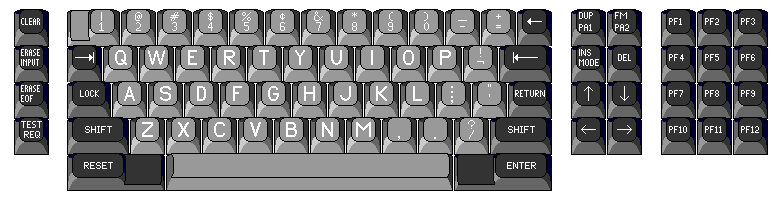
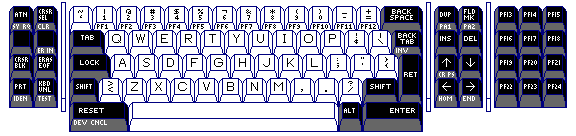
Well before the IBM PC came out, this terminal was updated, and its replacement, the IBM 3278 Display Station, had this as one of its keyboard arrangements:
Another IBM product whose successor was affected by this transformation was the IBM System/32, whose keyboard is shown below:
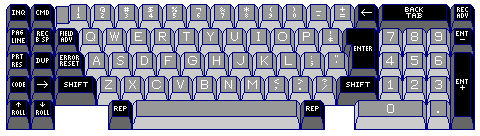
This was the keyboard of the computer itself; workstations could be attached to it which usually had a different keyboard arrangement without a numeric keypad. It used a small plasma display with eight lines of text.
Later, the IBM 5251 Display Station was used with the System/34 computer, and its keyboard had the following arrangement:
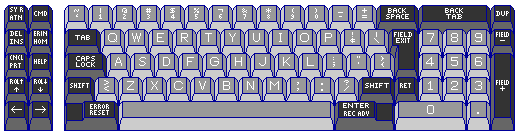
Similar terminals were also used with the IBM 5280 Distributed Data System, the IBM System/38 computer, and the IBM Series/1 minicomputer.
As the diagram below illustrates,
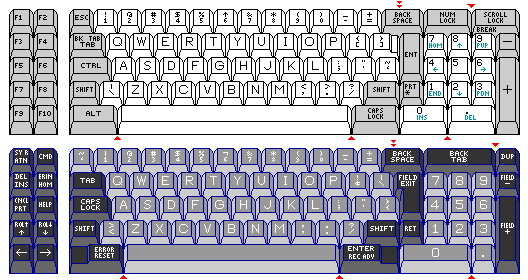
the keyboard of this terminal had the same number of keys as that of the IBM PC, and there were only some minor differences in the widths of a few keys.
And, thus it was, that when IBM came out with its Displaywriter standalone word processor, which used the IBM 8086 microprocessor and 8-inch floppies, some time before the IBM Personal Computer was introduced, it had a keyboard which in some ways resembled that of the 5251:
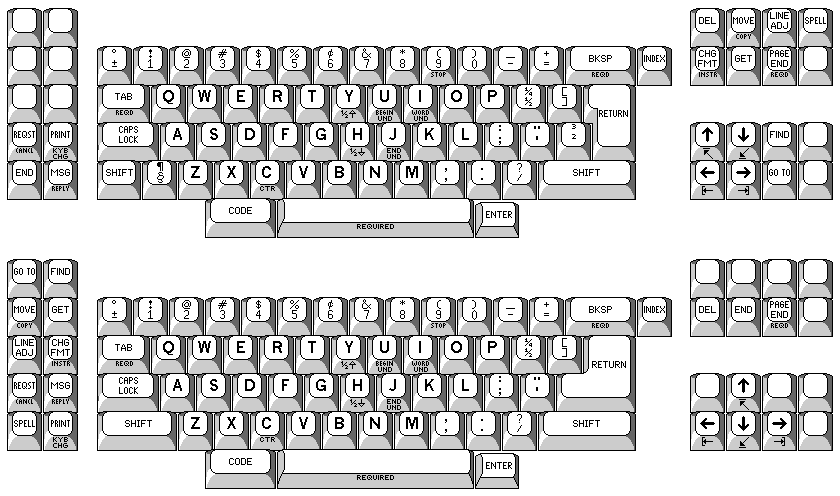
However, the keyboard for the Displaywriter came in alternate versions. In addition to there being a choice between a 48-key version and a 46-key version, as shown in the illustration above, note that two possible variations of the positions of various special function keys are also shown in the illustration.
The IBM 5253 Display Station, which was used with another IBM product of the same time as the IBM 5251 Display Station mentioned above, part of the IBM 5520 Administrative System, a document management system announced on November 1, 1979. It looked almost identical to the IBM 5251 Display Station in general appearance, but the layout of its keyboard was very similar to that of the Displaywriter, as can be seen below:
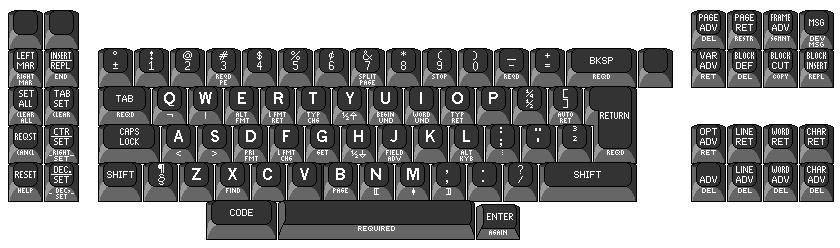
As noted, the IBM 5520 Administrative System was announced on November 1, 1979. The Displaywriter was introduced later, in June 1980, but still before the IBM PC, announced on the historic date of August 12, 1981, as noted above.
Even the humble Selectric typewriter, the original keyboard of which is shown below:
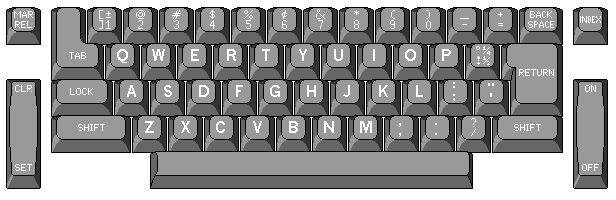
was altered when the Selectric III typewriter was introduced:
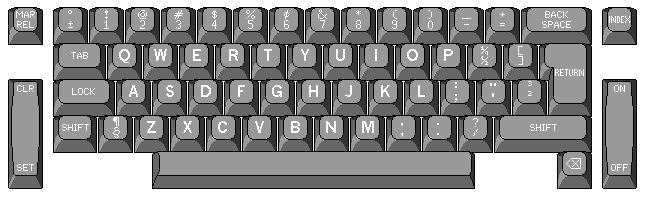
Here, since the Selectric III typewriter was a mechanical device that didn't connect to anything, it wasn't compatibility with ASCII that was the goal, but a larger character set was still useful, to provide accented letters for foreign languages without having, in turn, to scrimp on punctuation marks and special symbols when doing so.
However, at least for the U.S. market, a version of the Selectric III with a 92-character keyboard was also made, as the limitation of not being able to access some of the letters on the element was, to many, less important than having a keyboard convenient to touch-typists.
This diagram, which also shows the arrangement of characters on the 96-character Selectric element, shows this 92-character keyboard:
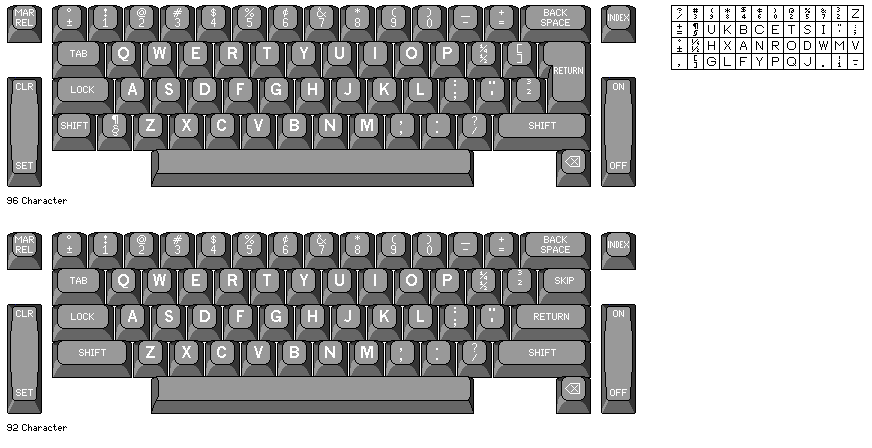
Note that it retained the superscript 2 and 3 instead of the square brackets, unlike the 92-character variant of the Displaywriter keyboard.
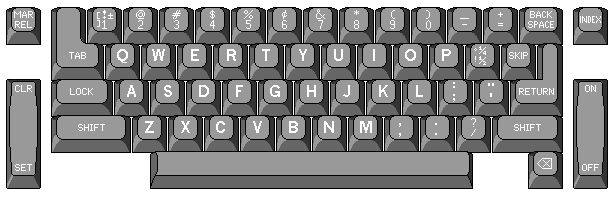
Also of interest is that when the Selectric typewriter first came out, there were offered two alternative character arrangements for the popular standard typestyles; one which offered the 1/4 and 1/2 fractions, a separate key for the digit 1, and the plus-minus symobl, and another which offered square brackets, a degree symbol, and an exclamation mark, but no fractions, and on which the lower-case letter L would have to be used for the digit 1. The typical 88-character arrangement, similar to the first one, but with an exclamation mark replacing the plus-minus symbol, was added later, as is illustrated by the keyboard of the Selectric II, here shown in its correcting form:
Also, the VT220 terminal from the Digital Equipment Corporation in 1983 includes a key between the key for Z and the left-hand shift key; this is after the introduction of the IBM PC, but before the 101-key keyboard came out:
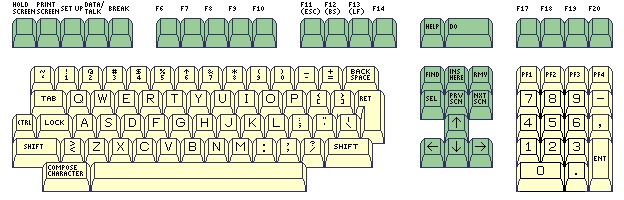
This keyboard is also sometimes referred to by its own part number, the LK201 keyboard. On the later VT330 terminal, the LK401 keyboard was used, which had basically the same layout, except that there was an "Alt Function" key on both sides of the space bar, and a second right "Compose Character" key.
Incidentally, the PF1 key on the VT100 or the VT220 is sometimes called the "gold key", particularly when this terminal is used with editor software, even today by VMS users.
This key is the same color as the other PF keys on the VT100 terminal, and on the earlier VT52 terminal, the key in the corresponding position is red in color. The solution to this apparent mystery lies in the keyboard of another device which closely resembles the VT52 terminal in general appearance:
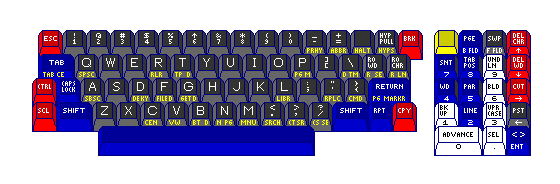
The VT78 word processing system from DEC, powered by a small internal computer sharing the PDP-8 architecture, is the one that had a gold-colored key in this position, giving it its name.
As well, displacement of both the left-hand shift key, and the Enter key as well, survives to this day on the international version of the keyboard for the successors of the IBM Personal Computer,
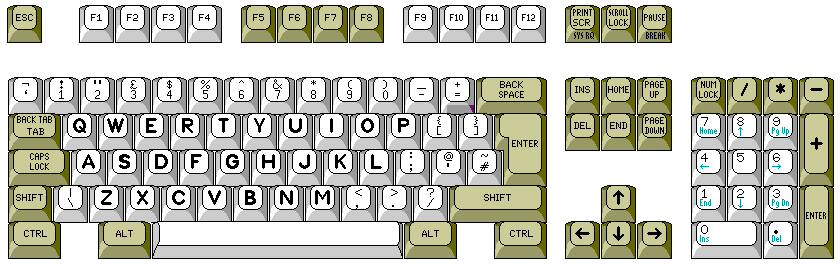
even in the United Kingdom of Great Britain and Northern Ireland, as the diagram above illustrates.
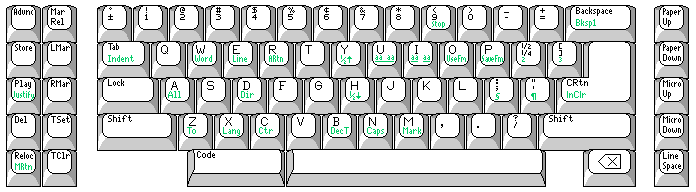
Later on, the IBM Wheelwriter series of typewriters, however, avoided the need to place an extra key between Z and the left-hand shift key by placing the two printable characters it would have held, the paragraph and section marks, as Code key shifts of :; and "'. As well, the Enter key was made larger by removing the key with superscript 2 and 3 (from the location of the |\ key on a U.S. 101-key PC keyboard) and placing its two characters on the ¼½ and [] keys (which are in the locations of the {[ and }] keys on a computer keyboard), as illustrated below by this diagram of the keyboard of an IBM Wheelwriter 6 typewriter:
Looking at things from the other perspective, in the sense of looking for computer terminals and microcomputers where the back space, Enter (or carriage return) and shift keys were all in the right places, one can go back to the IBM 2741 terminal itself as an early example. When it comes to ASCII terminals and microcomputers, generally the best of the typewriter-pairing ASCII terminals had most of the keys in the right place, but the back space key was moved over one position to make way for the tilde and opening quote. Two early exceptions were the Radio Shack Model 100 portable computer, as shown here:
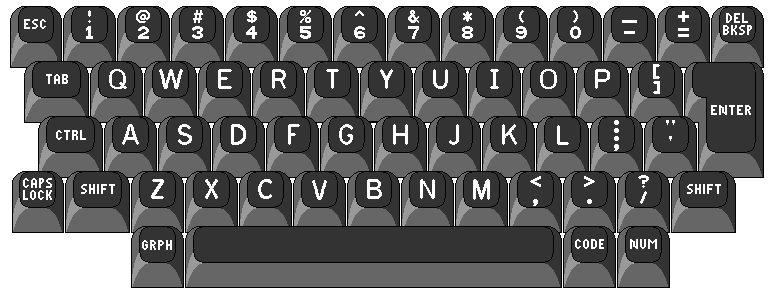
As noted elsewhere on this site, the graphics shift key, GRPH, was used to access the ASCII characters not explicitly included on the keyboard: backslash (\) was grph-minus (-), opening quote (`) was grph-open square bracket ([) (which, of course, is shift-grph-close square bracket), open brace ({) was grph-9, close brace (}) was grph-0, vertical bar (|) was grph-underscore (_) (which, of course, is shift-grph-minus), and tilde (~) was grph-close square bracket (]).
and the Radio Shack Model II computer (illustrated below); both of these achieved a typewriter-like arrangement through omitting some keys.
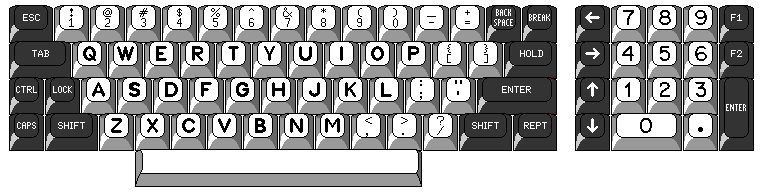
Here, backslash (\) could be typed as ctrl-9, vertical bar (|) as ctrl-0, and tilde (~) as ctrl-6, at least when within the BASIC interpreter; but the opening single quote (`) apparently could not be entered from the keyboard at all.
Even the Spectravideo 328 computer, the more expensive of the two computers from Spectravideo which ended up as the prototypes for the MSX 8-bit computer standard, used this approach:
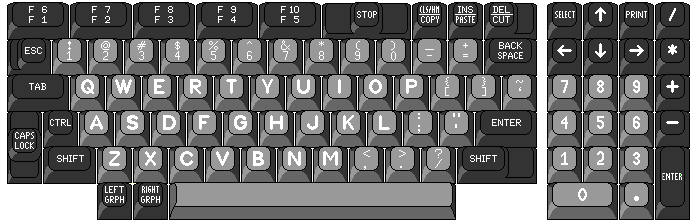
While the arrangement of the printable character keys resembles that of the Model M keyboard for the IBM PC quite a bit, the ESC key is retained in its traditional position, and so the key with the vertical bar and backslash is omitted, the tilde and opening single quote going in that position instead.
A terminal used with the WANG 2000 computer system also used the approach of omitting a few characters to allow a typewriter-like layout as well:
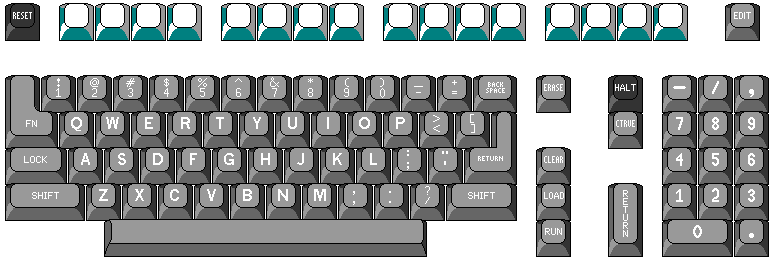
Another way to maintain a keyboard in which the Enter, Shift, and Backspace keys are all within easy reach was used on the keyboard of the Fortune Systems Fortune 32:16 computer, as shown below:
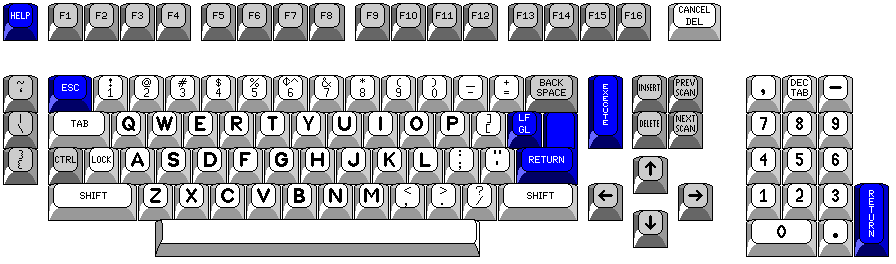
Instead of omitting the extra keys required by ASCII, just put them off to one side. This also made it easier to explain that the characters on the keys put to one side would not print when a daisywheel printer with an 88-character element was used with the computer.
The Macintosh, even when it first became available in 1984, used a keyboard which moved the tilde and opening quote to where the Escape key is usually placed, the arrangement that later became standard for the IBM PC.
Copyright (c) 2003, 2005, 2007 John J. G. Savard