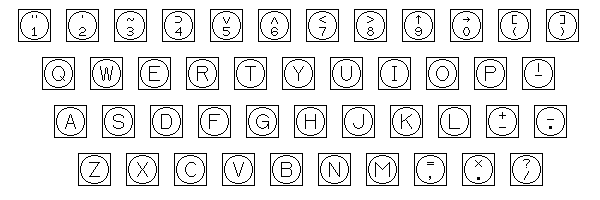
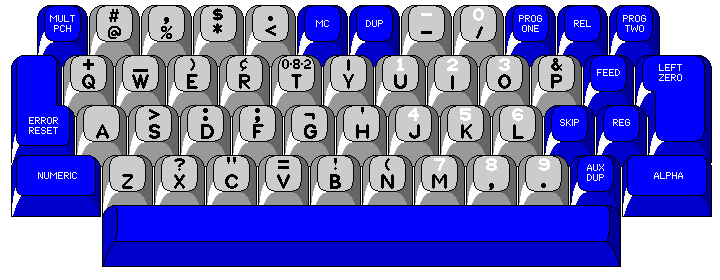
To begin this page, we will look at a keyboard that only a fortunate few have had the opportunity to use, but which only has a character set of normal size:
This is the keyboard for the Digital Equipment Corporation's Flexowriter Input/Output code, as used with both the PDP-1 and PDP-4 computers before ASCII arrived to take over. The terminal was a converted IBM electric typewriter (Model B), adapted by Soroban, but the data transmission code resembled that of a 2741. (Incidentally, a Flexowriter looks suspiciously like a Model 01 electric typewriter; doubtless, there is a story behind that... and indeed there is. The company that made the electric motors for an early Remington electric typewriter that was unsuccessful then made its own, and IBM bought the rights to the typewriter, but another company, later bought out by Friden, bought the rights to a teletypewriter based on the same mechanism.)
And now for a keyboard actually used on a Flexowriter,
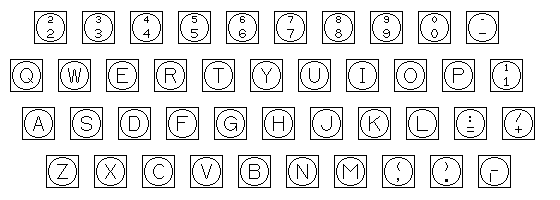
that used for the Flexowriters used with the Whirlwind computer.
The digits and the minus sign all had superscript versions as their shifts; this allowed numbers to be raised to integer powers in the Laning and Zierler system, which was one of the handful of higher-level language systems which preceded FORTRAN. Functions, such as trig functions, were represented by an upper-case F with a superscript; variable names were a single lower-case letter, allowing multiplication without an explicit operator as in conventional algebraic notation.
And, of course, if I'm going to discuss the Laning and Zierler system, how can I possibly omit a reference to the famous Klerer-May system?
According to some references, a Flexowriter with a special character set was originally used for this system. However, later on, special terminals, built by the Invac Corporation, and based on the Selectric mechanism, were used, with the type elements bearing the special character set being made by Camwil, a company that specialized in making customized Selectric elements.
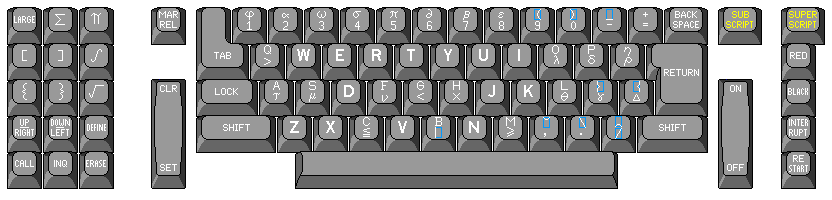
In drawing the image here, although I have based it on the Invac terminal, I have taken some liberties. The keys on that terminal were black, while in the diagram they are merely a dark grey.
Also, the symbols which are used to build large-sized symbols, and thus which fill the character cell, are shown in blue boxes giving the outline of the character cell, just as graphics characters were often shown in outline boxes on a number of 8-bit home computers (although usually not in a different color); this was not done on that terminal, but it seemed to me that this would add clarity.
Note that some keys have a capital letter at the top, with another symbol below; those that instead are filled with a capital letter give the corresponding lower-case letter below.
The symbols on the keypad to the left of the main keyboard trigger the printing of a large-size symbol (which can be made even larger by using the LARGE key) built up of component symbols, without the user needing to type in the individual building blocks.
Amazingly enough, this is not even the only example of a keyboard with an incomplete lower-case alphabet devised for computers. The Lincoln Writer, an input device used with the TX-2 computer, also had such a character set.
While the assortment of printable characters was not too large to fit on a normal Flexowriter, as the character code was a six-bit code with two shift states, because nearly all the codes were used to provide a large number of special functions, the Lincoln Writer's keyboard consisted of two conventional keyboard layouts one above the other.
Before IBM created the APL keyboard, for the Los Alamos Scientific Laboratory IBM created, for use with the STRETCH computer from IBM that they had purchased, the 9210 Scientific Descriptive Printer, which also had an unusual keyboard with a lot of mathematical symbols on it. It was a keypunch rather than an interactive printing terminal, but it also included a typewriter; since it was designed to prepare punched cards containing programs in the programming language COLASL, and that language used mathematical expressions in a two-dimensional notation, each line of the program could correspond to up to three punched cards. Thus, instead of producing interpreted cards, a copy of the program was typed at the same time the cards were punched to allow the operator to keep track of the program being enetered.
Like APL, it even used italics to distinguish between letters and digits, although in its case it was the digits that were italicized.
Although I had found a photo of the keyboard that allowed me to learn the layout of the keys, it was too blurry for me to make out what was written on the various keys for shifts and control characters.
Later, however, I found another source that did give me the characters on each key, so I can present the diagram of this keyboard shown below:
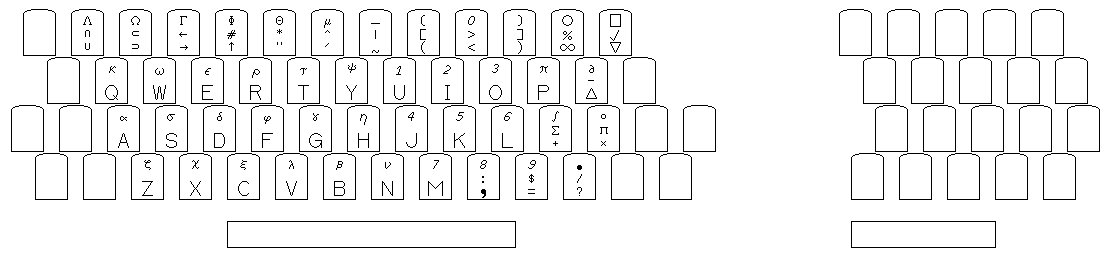
This diagram shows where the various printable characters it offered were available. However, the arrangement of the characters on the keys has been conventionalized: the "third case" is at the top, with upper case in the middle and lower case at the bottom; larger capital letters are on the keys instead of showing the lower-case letters explicitly, and the characters are one above the other vertically.
On the keyboard of the actual 9210 Scientific Descriptive Printer, the letter keys showed both the upper-case and lower-case letters, the "third shift" characters were at the bottom, and instead of being in a vertical line, the upper character was on the left, and the lower character on the right, to make room for larger characters on the keys. I felt that conventionalizing the diagram would make it easier to understand.
The reason for the unusual placement of the digits on the keys is due to the fact that it was a keypunch; the keyboard of a conventional keypunch is illustrated below for comparison:
Another very early example of a large keyboard is the one for the Uniscope 300 terminal. The image below does not quite do it justice:
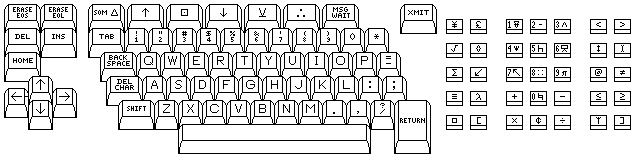
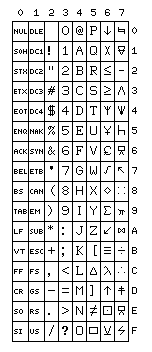
The character set used with this keyboard was achieved using the same character codes as used for normal ASCII characters; the codes we now use for lower-case characters, which may not even have yet been assigned that meaning when this terminal was designed, are the ones used for the special symbols on this keyboard: the codes it generated corresponded to conventional ASCII in this fashion:
\     m     n     `     o     |
                                                     e   f     q   r   s     <   >
    !   "   #   $   %   &   '   (   )
    1   2   3   4   5   6   7   8   9   0   *
                                                     g   h     t   u   v     |   a
                                              =
      Q   W   E   R   T   Y   U   I   O   P   -
                                                     i   j     w   x   y     @   ^

       A   S   D   F   G   H   J   K   L   ;   :
                                                     k   l     +   p   -     b   c
                                             ?
         Z   X   C   V   B   N   M   ,   .   /
                                                     _   [     z   ~   {     d   ]
I suspect software on the mainframe to which this terminal communicated translated characters for the numeric keypad, given the bit-pairing arrangement, although, as the relationship between the normal codes for those keys and those for the digits is also bit-pairing, this may not necessarily be the case.
The area on the right side with the numeric keypad and all the special characters was designed for the use of keyboard overlays, and it appears to me that this was its usual use, and the special symbols were not used as often, although I suspect they may have been used also, but for an interactive calculator rather than a programming language.
Here is a diagram of the modified version of ASCII that it used, as best as I can guess what the characters are:
Incidentally, this terminal was announced by Univac in 1967 (although some sources date it to 1964), and it offered many features that would later be found with the IBM 3270 series of terminals. However, when the IBM 360 was first announced in 1964, the video terminal offered for it was the 1050, which had a small round CRT display in a large box. This was quickly replaced by the IBM 2260 in 1965, which was a normal computer terminal in appearance.
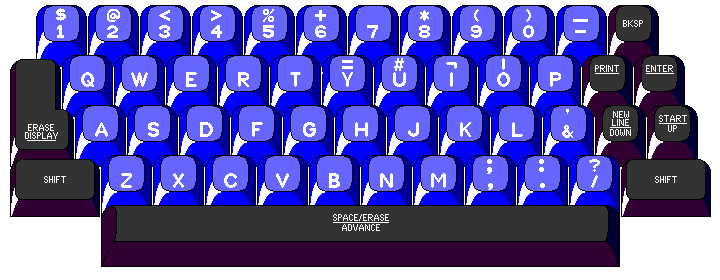
The keyboard of the 2260, illustrated above, illustrates a particularly small keyboard for what was still a capable terminal.
Fields on the screen could be ended by "New Line" characters, to separate areas in which the user entered information from labels which would remain on the screen undisturbed. (They were started at the beginning of the line, with one "Start Manual Input" character beginning the area containing input fields.) Also, a nondestructive cursor was available as an optional feature for the 2260. Thus, the 2260 provided intelligent terminal features, although it was less elaborate than the later 3270. The 2260 terminal itself, however, was only a video display; the actual electronics for converting characters to a video signal was contained in the IBM 2848 Display Controller. The similar 2265 terminal, on the other hand, was self-contained.
This allowed the same basic terminal hardware (but sold under a different model number, as the 1510) to be attached to a different type of display controller in the IBM 1500 instructional system which could display graphics on its screen.
While the 3270 visually indicated data entry fields by changes in highlighting, this was controlled by an attribute control character which displayed as a blank and thus also occupied a character position. Incidentally, both the 3270 and the 2260 could come with alternate keyboards with a keypunch-style layout, but in the case of the 2260, this was associated with a special data-entry configuration that included extended cursor-control features. Thus, there were four levels of cursor control available with the 2260: the standard one, the nondestructive cursor feature; the extended cursor control feature which made the space bar repeating and which moved "erase display" to a separate button, using its former key as the tab key, which moved to a colon in the display marking a tab stop; and the data-entry feature, which required a special display controller.
The IBM 3270 did not become available until 1972, although it was announced on May 6, 1971.
Here is a keyboard which includes the special characters used with the ALGOL-60 publication language:
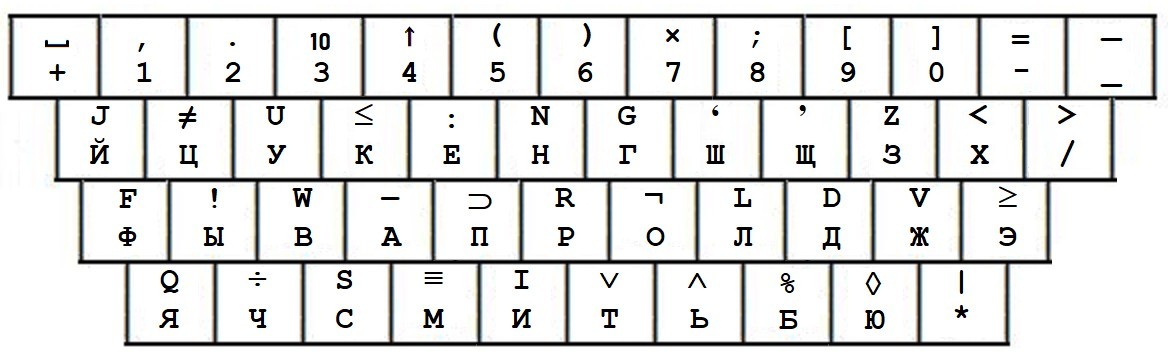
It was used with a terminal for the Minsk-32 computer in the Soviet Union.
You will notice that this keyboard includes four characters the graphical representations of which are horizontal lines. From descriptions of the character set in association with its binary and punched card encodings, I know that the four characters are the minus sign (0-3-8), the underscore (12-2-3-8-9), the hyphen (0-3-5-8-9), and a horizontal line (12-1-3-8-9), presumably intended for drawing diagrams or forms on the printer.
I can only guess at where they go on the keyboard; my guess, for what little it is worth, is that the hyphen is above the A, the minus sign is below the equals sign and to the right of them is the horizontal line above the underscore.
This keyboard diagram differs from that in my source as I have put what I believe should be considered as the shifted characters on the top of the keys, which means that they are swapped vertically from where they were in the image I took as my source.
What I am always hoping for in keyboards, besides a conventional arrangement, is convenience in entering characters additional to those of 7-bit ASCII.
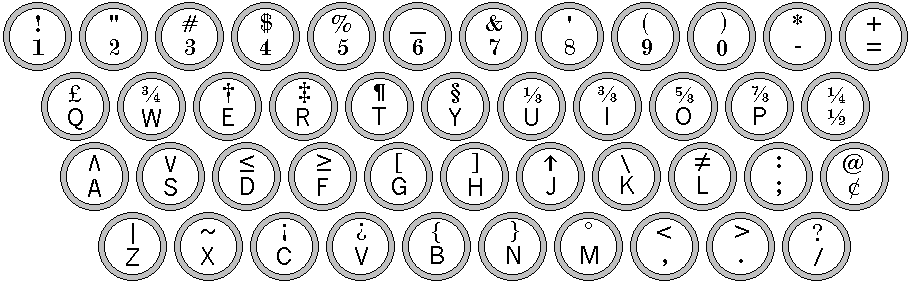
Now this is a keyboard, and based on the manual typewriter, yet!
For something with a somewhat augmented character set, and some unusual control functions, here
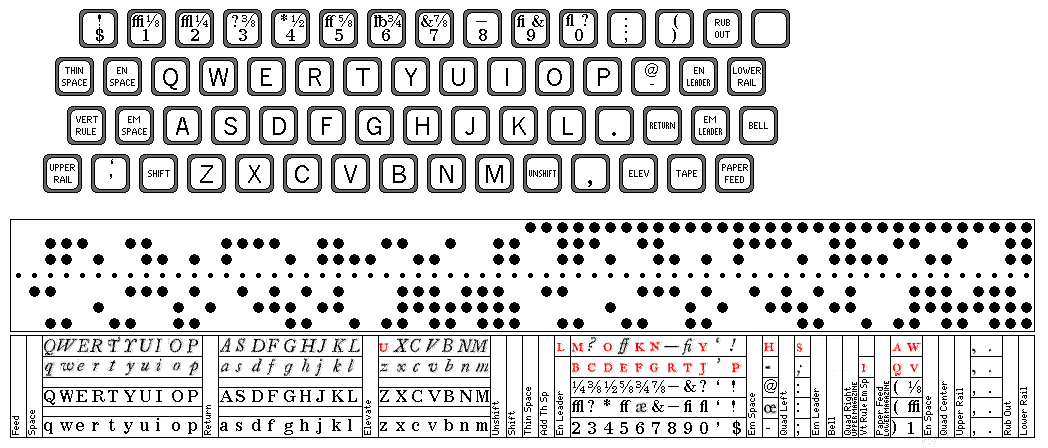
is the keyboard of a Teletypesetter Perforator, for a real trip down memory lane for some readers of this page, along with a chart of the six-unit character code it generates.
Included in this chart is a possible result of switching rails with this keyboard. Small capitals are shown in red, note that text in small capitals may have shift codes within it. The cause of this, of course, is that a teletypesetter keyboard is intended to provide a paper tape that will be used by a machine that operates a Linotype keyboard, and so the small capital letters must be placed in positions corresponding to characters having the same width.
But the kind of keyboard I'm really looking for would look more like this:
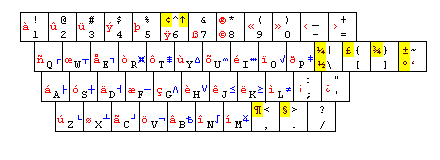
Programming and mathematical symbols, reached by an alternate shift, are on the right side in blue; word processing characters are on the left side in red. Dark red (and dark blue) with yellow background highlighting indicates character substitutes; normal red and blue, characters reached by an alternate shift.
Now, let us look at some of the real-life keyboards that inspired me to think in such terms.
First, here are some alternate keyboard arrangements offered by IBM for the 3277 display station. A conventional keyboard arrangement for this terminal is shown below:
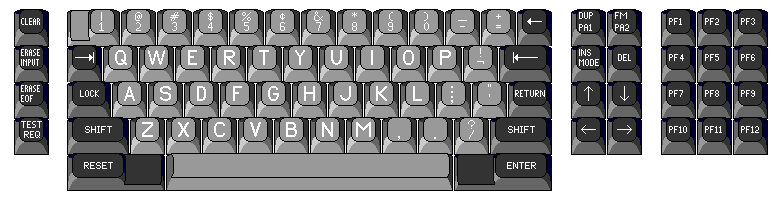
IBM made more Spartan keyboard arrangements for this terminal as well. Despite appearances, terminals with this keyboard normally did not support lower-case letters. But lower-case alphabetics were included if you got this version of the keyboard:
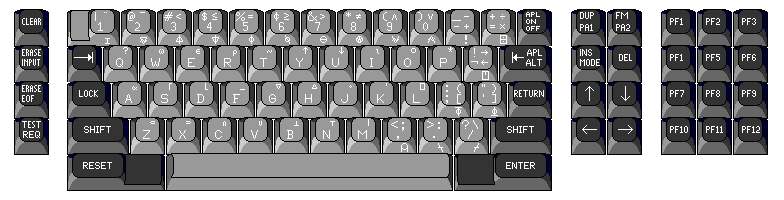
which provided an alternate mode for entering APL characters, including a third shift by means of which the overstrikes used in APLSV, which used the overstruck characters of APL\360 plus three additional ones, could be produced as independent characters.
In our survey of large keyboards, first we will look at the next keyboard in this progression, the text keyboard for the 3277. This keyboard allowed entry of the APL character set, including overstrikes, and it also allowed direct entry of the special characters available on the TN print train, including a few characters which were overstrikes of the symbols actually provided on that print train, for drawing lines around boxes on forms.
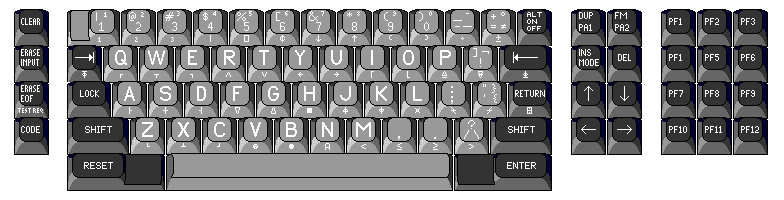
This keyboard, although some might find it cluttered, was at least made available as a commercial product by a large and reputable company. Thus, even if some might still find it intimidating, it really was kept within reasonable limits.
One interesting thing about this keyboard is that, in addition to the characters of the TN print train, it also included a few characters peculiar to APL.
But it did not include the entire APL character set. Thus, why were some characters that would only be used with APL included on this keyboard, if it could not actually be used for APL programming?
The conclusion that appears obvious is that it was possible to use APL from a 3277 Display Station with a Text keyboard. But how? I haven't been able to find documentation of this online.
Some of the omitted APL characters are ones that are not normally used in APL/360; alpha, omega, subset, superset, union, and intersection, for example. The forms drawing characters that look like a T and an upside-down T could be used as substitutes for the similar APL characters, even if they are printed in different positions (instead of making the I-beam if overstruck, they would make a plus sign).
One APL character that is included is the quad. Since, in APLSV, the quad followed by a two-letter code is used to represent a number of special functions, concievably this notation might have been used to represent any required APL character not on the keyboard, such as iota.
Speaking of keyboards only a few people had the opportunity to experience, and proceeding to our topic for this page of keyboards for large character sets, I commend to your attention this link, wherein are shown two keyboards designed by one Thomas Knight (the second one, however, according to one source, was actually designed by one John Kulp), and an illustration of a Japanese-language full-matrix keyboard as well.
An advertisement for the MIT CADR computer on Al Kossow's site shows a keyboard whose arrangement of keys is that of the keyboard termed the "Space Cadet" keyboard on the site mentioned in the previous paragraph; its layout is the following:

This was the original version of the keyboard used with the famous LISP Machine, commercially sold by Symbolics. Later versions of the keyboard removed the special characters from the keys, but retained more than the usual complement of special function keys, and also retained the three additional shifts, Meta, Super, and Hyper. This keyboard is illustrated below:
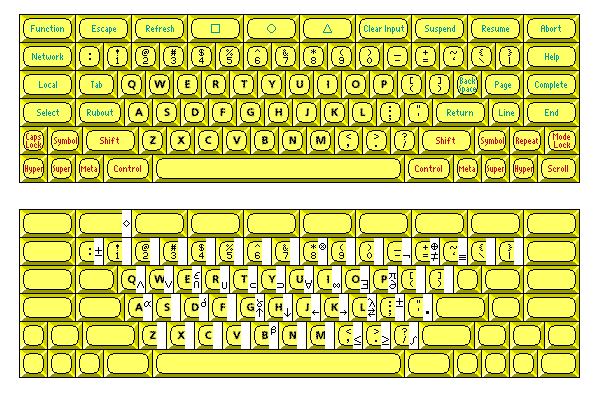
Although the symbols were not printed on the keys, a symbol shift was still present; the assortment of symbols was reduced somewhat, however, the provision of the complete Greek alphabet having been foreborne.
A keyboard of this type was made that would connect to the Macintosh computer, provided with a set of circuit boards that provided a Lisp Machine processor, this keyboard is known as the MacIvory keyboard, and is held in fond regard by many.
This type of keyboard was apparently in more general use at MIT's Artificial Intelligence laboratories; thus, the famous Emacs text editor was originally developed for use with this or a related keyboard, but it was originally a front-end for the TECO editor on a PDP-10 at that site.
Of course, there are those who will say that there is nothing particularly remarkable about an otherwise normal keyboard that provides an extensive set of special characters through the use of a special shift key:
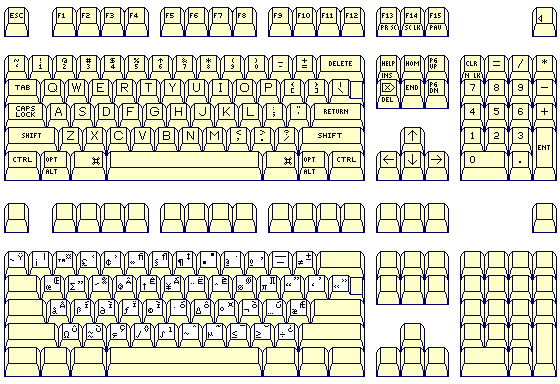
and, more specifically, that one does not need to purchase an extra set of circuit boards for a Macintosh to give it this capability; the diagram above shows the characters obtainable on a Macintosh using the option key, alone or in combination with the shift key.
The Knight keyboard was the immediate antecedent of the Space Cadet keyboard, and, while it had quite a few keys, and quite a few symbols on those keys, it did not have as many of either than that keyboard, even if it still had more than most other keyboards. It is pictured below:
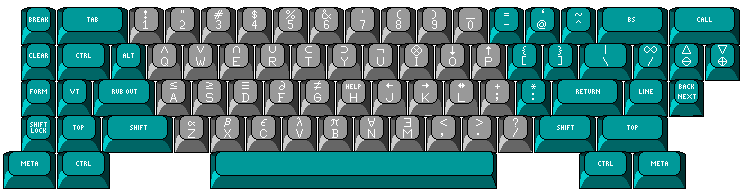
This keyboard was used for connecting to the PDP-10 computer in the Artificial Intelligence laboratory at MIT, which is why it served as an inspiration for the Space Cadet keyboard, used for a computer designed to run LISP that was developed at MIT.
In turn, the Knight keyboard itself drew its inspiration from the keyboard used for terminals at the Stanford Artificial Intelligence Laboratory (SAIL). These keyboards were also rather large by ordinary standards, although they were a bit smaller even than the Knight keyboard:
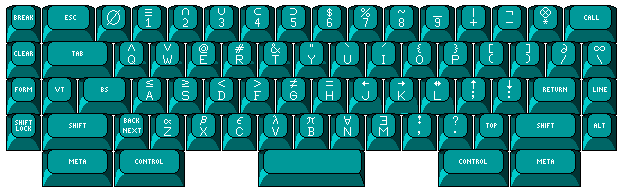
Incidentally, what may appear to have been an error in drawing the keyboard above was instead an actual error in (or at least, characteristic of) its physical design: instead of the four rows of the main typing area being staggered by half a key, a quarter of a key, and half a key, as one goes down from the top, each row actually was staggered to the right by half a key.
The Xerox Star workstation, of course, was a historic machine in the development of the graphical user interface, and it had a keyboard with a number of extra specialized keys:
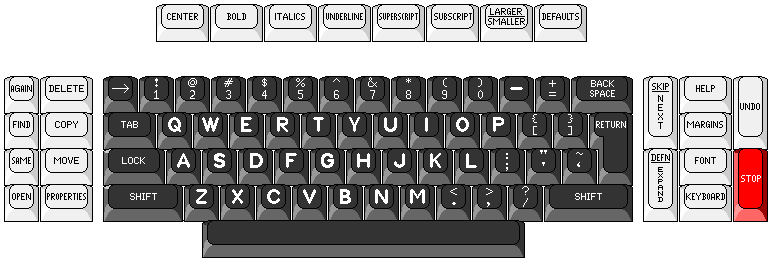
Since this page includes a number of specialized scientific or academic keyboards that are not particularly large, I think it is probably the best place to show this historically important keyboard:
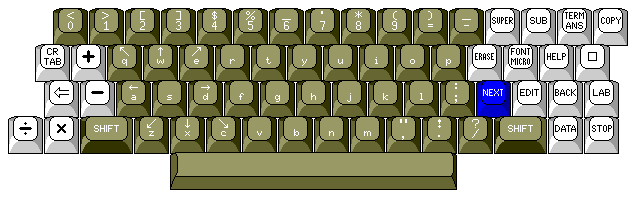
This is the keyboard found on a terminal for the PLATO system from Control Data. This keyboard has a number of unusual characteristics, but they are explained by the use of this system, as an instructional system for education.
Thus, the digits are shown in genuine numerical order, starting with zero.
Since the lower half of the other keys shows the character they type when unshifted, naturally, to be consistent, the letter keys should show the lower case letters on their lower halves.
Some people find the Symbolics keyboard shown above to be the best keyboard for use with operating systems such as Linux; others find the keyboard below to be the one they prefer, and, thus, as another example of an ideal keyboard for this purpose, I show it here although it is not a particularly large keyboard:
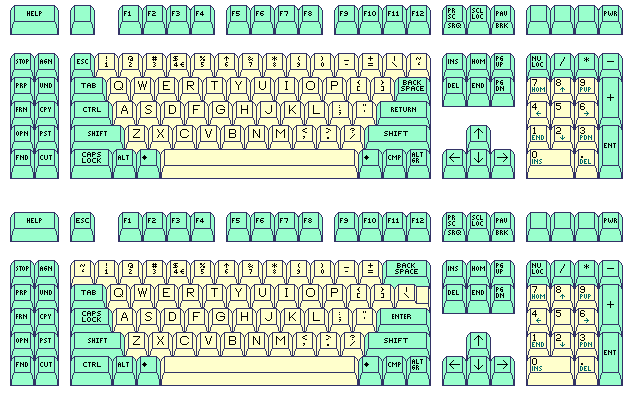
this being the layout of the most recent version of the keyboard used with Sun workstations, which is available in two different styles according to taste.
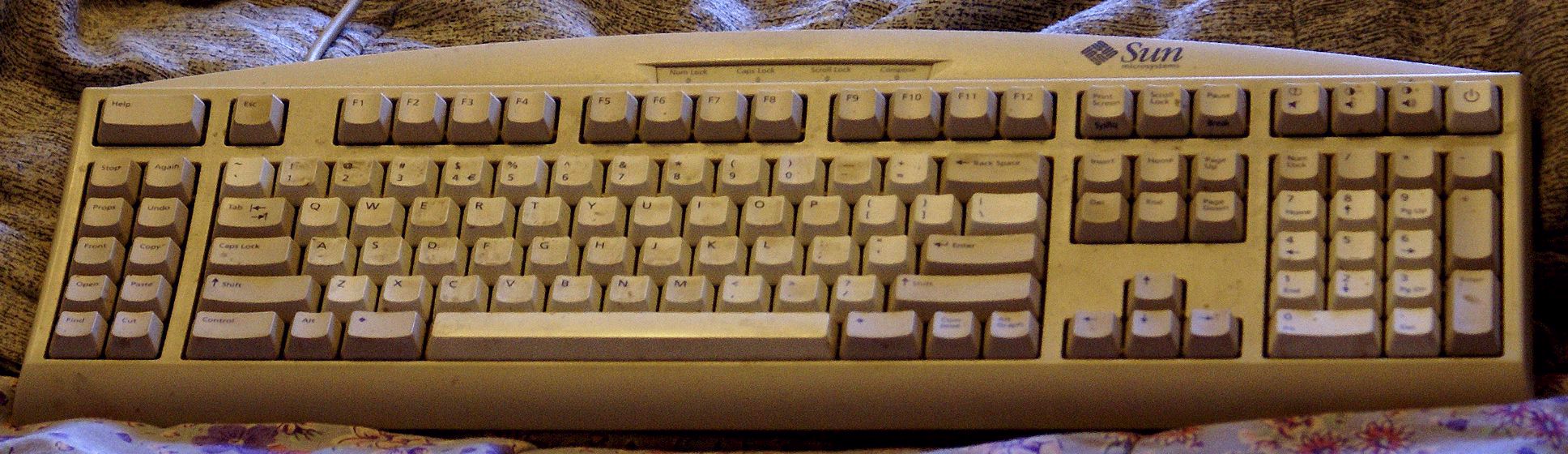
A photograph of a Sun keyboard is shown below:
A large and elaborate keyboard that had a bit-pairing arrangement was that from the Intecolor and Compucolor computers:
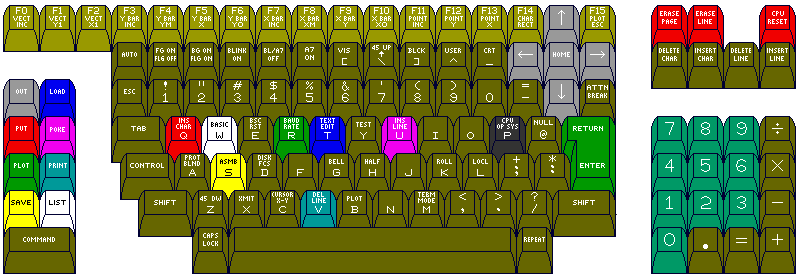
This company made a very successful line of computers and terminals for industrial control purposes, but while it was one of the early entries into the home computer market, it achieved less success there.
The keyboard looks like it only supports upper-case, since none of the special characters added when lowercase was added to ASCII are visible. But it does have a CAPS LOCK key. The characters [, \, ], ^, and _ are all on separate keys, making it possible to shift the letters for upper and lower case. What is happening here is this: normally, some models of these computers, such as the Intecolor 3621, are upper-case only, but an optional character generator ROM providing lowercase is available as an option. As some of the Intecolor computers (the Intecolor 8063 and 8963) were CP/M-compatible machines, this would have been vital to permit their use in word processing.
Another example of a keyboard which included many special characters (including those found in APL, but without being primarily an APL keyboard) is the arrangement used at Lawrence Livermore Laboratories for an 8-bit version of ASCII.
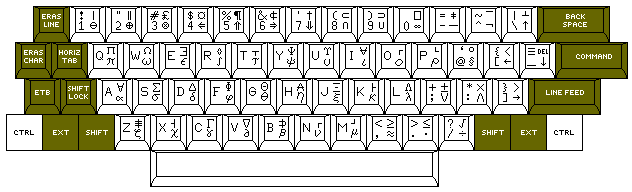
The keyboard used for the Lawrence Livermore Labs version of 8-bit ASCII was based on the standard bit-pairing arrangement. This meant that a standard bit-pairing keyboard could be used, with only a very small amount of additional circuitry, and special keycaps.
The Ctrl, Ext, and Shift keys had a special design; by having plain flat tops, a single finger could hold down either both Ctrl and Ext, or both Ext and Shift, at the same time, thus facilitating the chording required to generate all the possible characters (including a second set of 32 control characters) with the keyboard.
It was claimed that this keyboard provided the whole APL character set, not including overstrikes, among the mathematical symbols and Greek letters it provided. However, this claim had at least one weakness: for encode and decode, it used characters which were clearly intended for drawing boxes for forms. So, if one wished to make the I-beam character as an overstrike, what one obtained looked more like a plus sign.
This keyboard dates from 1974. I thought it might have inspired the Knight keyboard and the later Space Cadet keyboard, as they are known, but I have since learned that the thread of their inspiration goes back to the early 1960s, through the keyboard used for the SAIL system at the Stanford Artificial Intelligence Laboratory. This system allowed a number of people to use terminals by using a disk drive at a central location to send the video signal to each of several terminals. Similar technology was also used in the IBM 1500 system, an educational computer system that could be built around either the IBM 1130 computer or the larger upwards-compatible (it supported two additional instructions) IBM 1800 computer. This meant that only one copy of much of the circuitry in a video terminal was needed to serve many users.
Several of the keyboards examined here attempted to provide, in addition to a large number of useful symbols, the entire APL character set. More recently, a keyboard design called the "union keyboard" provided the entire APL character set, including the overstrikes required by several APL dialects, through supplementary shifts to a keyboard which normally provides all the ASCII characters in their usual positions.
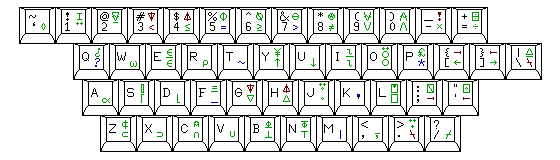
In the diagram above, some characters which occur in two possible locations are shown in either red or blue, the remaining characters accessed by the Alt key for APL use being shown in green.